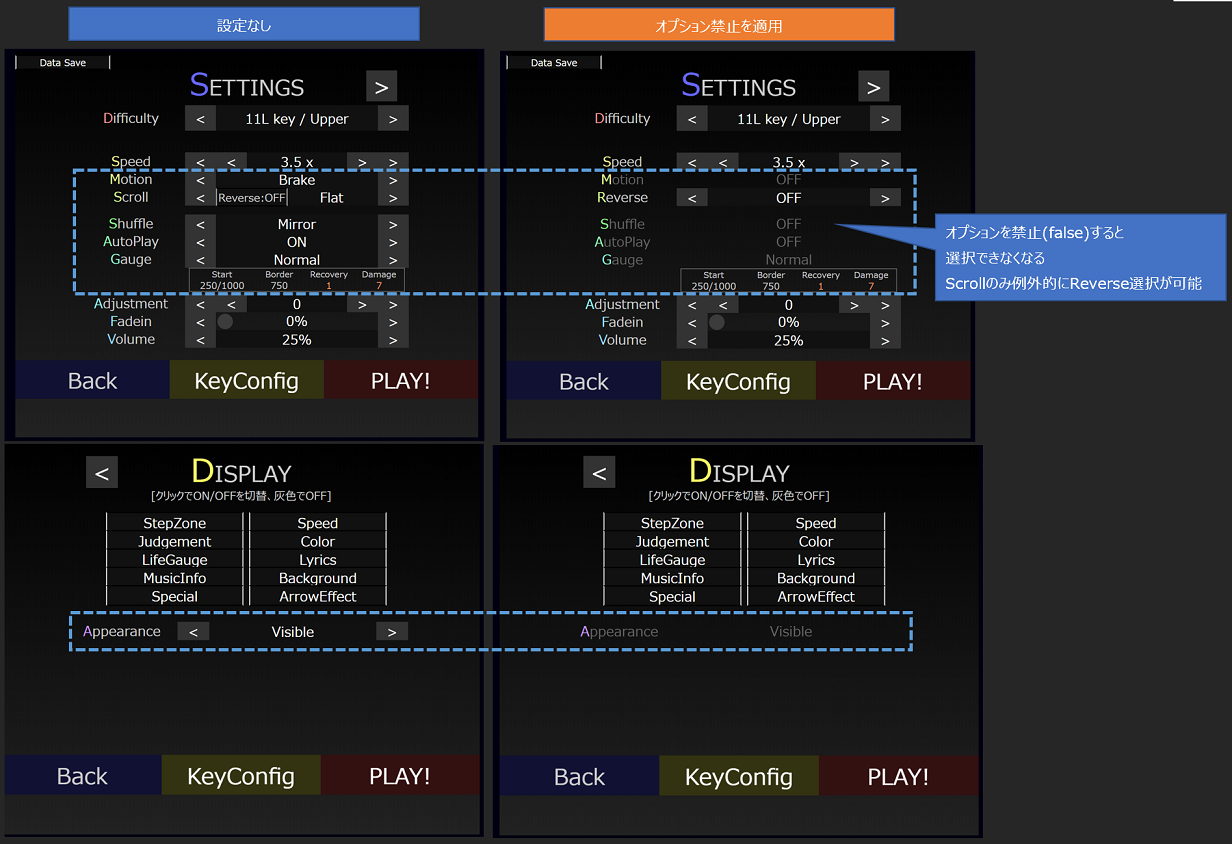
|motionUse=false|
|scrollUse=false|
|shuffleUse=false|
|autoPlayUse=false|
|gaugeUse=false|
|appearanceUse=false|
設定画面の項目「Motion」「Scroll」「Shuffle」「AutoPlay」「Gauge」「Appearance」を作品の都合上使用させない場合に使用します。
「ScrollUse」については、falseにした場合でもReverseは設定可能です。
| 値 | 既定 | 内容 |
|---|---|---|
| false | 設定変更不可 | |
| true | * | 設定変更可 |
g_presetSettingUseで作品共通に指定できます。const g_presetSettingUse = {
motion: `true`,
scroll: `true`,
shuffle: `true`,
autoPlay: `true`,
gauge: `true`,
appearance: `true`,
};
| Version | 変更内容 |
|---|---|
| v10.2.1 | スクロール拡張実装に伴い、Scrollの利用有無設定を追加 |
| v9.0.0 | Appearance実装に伴い、Appearanceの利用有無設定を追加 |
| v3.1.0 | 初回実装 |