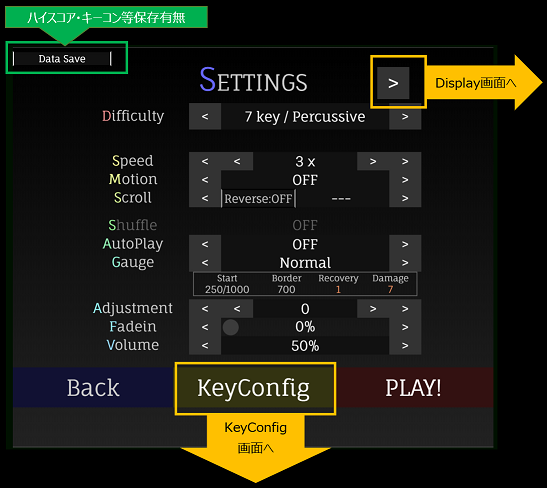
譜面が複数あれば、変更することができます。
(Set the charts if the works have multiple charts.)
1x から 10x の間で矢印の流れる速度を変更できます。
※譜面により、これ以上(以下)の速度で矢印が流れてくる場合があります。
(Set the speed of the sequences between 1x and 10x.)
矢印の速度を一定ではなく、変動させるモーションをつけるか設定します。
(Set the motion of sequences to make it faster or slower on the way.)
| 種類 | 内容 |
|---|---|
| OFF | 変化なし (Same speed from beginning to end) |
| Boost | 初めは初速、ステップゾーンに近づくにつれて速くなります。 (Initially initial speed, faster as it gets closer to the step zone) |
| Brake | 初めは速く、ステップゾーンに近づくにつれて初速になります。 (Initially fast, and becomes initial speed as it gets closer to the step zone) |
矢印の流れる向きを設定します。
(Set the flow direction of the sequences.)
| 種類 | 内容 |
|---|---|
| OFF | 下から上へ流れます。 両方にステップゾーンがある場合は一部上から下へも流れます。 (Generally, it flows from bottom to top.) |
| ON | 上から下へ流れます。 両方にステップゾーンがある場合は、OFFの状態に対してそれぞれ逆になります。 (Generally, it flows from top to bottom.) |
各レーンのスクロール方向をパターンに沿って設定します。
(Set the scroll direction of each lane according to the pattern.)
| 種類 | 内容 |
|---|---|
| --- | すべてのレーンが同じ方向に流れます。 (All lanes flow in the same direction.) |
| Cross | 正、逆、正の順に流れるよう設定します。 (Generally, set the flow to be default, reverse, and default.) |
| Split | 中央を境界として、スクロール方向を反転します。 (Reverses the scroll direction with the center as the boundary.) |
| Alternate | 交互にスクロール方向が反転するよう設定します。 (Set the scroll direction to be reversed alternately.) |
| Twist | Crossの亜種で、もう少し細かくスクロール方向が反転するよう設定します。 (A variant of "Cross" that sets the scroll direction to be slightly more reversed.) |
| Asymmetry | Alternateの亜種で、基本的には交互にスクロール方向が反転するよう設定しますが、左右非対称になるよう設定します。 (A variant of "Alternate" that basically sets the scroll direction to be alternately reversed, but sets it to be asymmetrical.) |
| Flat | すべてのレーンが矢印の重なりに関係なく同じ方向に流れます。 一部のキーのみ使用できます。 (All lanes flow in the same direction regardless of arrow overlap. Only some keys can be used.) |
譜面を左右反転したり、ランダムにします。
ランダムにした場合は別譜面扱いとなり、ハイスコアは保存されません。
(Flip the sequences left or right or make it random.
If you make it random, it will be treated as another sequences, and the high score will not be saved.)
| 種類 | 内容 |
|---|---|
| OFF | 変化なし |
| Mirror | 譜面をグループレーンごとに左右反転します。 (Flip the sequences horizontally for each group lane.) |
| Random | 譜面をグループレーンごとにランダムに再配置します。 (Rearrange the sequences randomly for each group lane.) |
| Random+ | 譜面をグループに関係なくレーンごとにランダムに再配置します。 (Rearrange the sequences randomly for each lane regardless of the group.) |
| S-Random | 譜面をグループごとに矢印個別にランダムに再配置します。 (Arrange the sequences randomly for each group by arrows.) |
| S-Random+ | 譜面をグループに関係なく矢印個別にランダムに再配置します。 (Arrange the sequences randomly regardless of the groups and arrows individually.) |
一部もしくは全てのキーをアシストするかどうかを設定します。
完全オートプレイ時はハイスコアを保存しません。
(Set whether some or all keys are assisted or not.
High score is not saved during full auto play.)
クリア条件を設定します。
Dancing☆Onigiri (CW Edition)の場合、
クリア条件設定は譜面により大きくライフ制ゲージ・ノルマ制ゲージに分かれます。
詳細は下記の通りです。
(Set the clear condition. The details are as follows.)
■ ライフ制ゲージ(回復・ダメージ固定) / Life-Left Mode
| 種類 | 概要 |
|---|---|
| Original | 回復・ダメージ量固定のデフォルトゲージです。 (Default) |
| Light | Originalと同じですが、Originalよりも回復量が大きくなっています。 (Same as "Original", but with greater recovery than "Original") |
| Heavy | Originalよりも回復量が小さく、ダメージが大きい設定です。 (The amount of recovery is smaller than "Original", and the damage is large.) |
| NoRecovery | ゲージが最初からMAXの状態で開始しますが、回復しません。 (The gauge starts from the beginning in the state of MAX but does not recover.) |
| SuddenDeath | 1ミス(ウワァン/イクナイ)で終了するモードです。 (It is a mode to end with 1 mistake.) |
■ ノルマ制ゲージ(回復・ダメージ変動) / Norm Mode
| 種類 | 概要 |
|---|---|
| Normal | ノルマ制ゲージが指定された場合のデフォルトゲージです。 目標ノルマ到達でクリアです。 (It is clear by reaching the target quota at the end of the play.) |
| Easy | Normalと同じですが、Normalよりも回復量が大きくなっています。 (Same as Normal, but with greater recovery than Normal) |
| Hard | ゲージが最初からMAXの状態で開始しますが、回復量が微小でダメージ量が大きいモードです。 最後までゲージが残っていればクリアです。 (The gauge starts from the beginning in the state of MAX, but it is a mode with a small amount of recovery and a large amount of damage. It is clear if the gauge remains to the end.) |
| SuddenDeath | 1ミス(ウワァン/イクナイ)で終了するモードです。 (It is a mode to end with 1 mistake.) |
タイミングにズレを感じる場合、数値を変えることでズレを直すことができます。
(If you feel a gap in timing, you can correct the gap by changing the value.)
譜面を途中から再生します。
途中から開始した場合はハイスコアを保存しません。
(Play the music from the middle.
High score is not saved if you start from the middle.)
ゲーム内の音量を設定します。
(Set the in-game volume.)
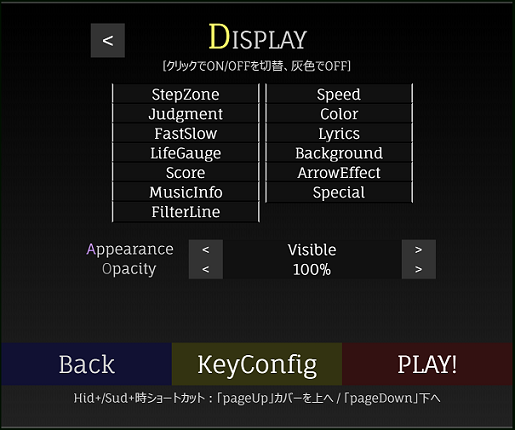
プレイ画面上に存在するものの表示/非表示を切り替えます。
(Switch between showing and hiding what exists on the play screen.)
| 種類 | 内容 |
|---|---|
| StepZone | ステップゾーンの表示 (Step zone) |
| Judgment | 判定キャラクタ・コンボの表示 (Judgment character and combo) |
| FastSlow | Fast/Slow表示 (Displays the number of difference frames by determining whether the timing of pressing is early or late) |
| LifeGauge | ライフゲージの表示 (Life gauge) |
| Score | 現時点の判定数を表示 (Display the current judgment count) |
| MusicInfo | 音楽情報(現状は時間表示のみ) (Music information (currently time display only)) |
| FilterLine | Hidden+, Sudden+使用時のフィルターの境界線表示 (Filter border display when using "Hidden+" or "Sudden+") |
| Speed | 途中変速、個別加速の有効化 (Enable mid-shift and individual acceleration) |
| Color | 色変化の有効化 (Enable color change) |
| Lyrics | 歌詞表示の有効化 (Enable lyrics display) |
| Background | 背景・マスクモーションの有効化 (Enable background and mask motion) |
| ArrowEffect | 矢印・フリーズアローモーションの有効化 (Enable arrow and freeze arrow motion) |
| Special | 作品固有の特殊演出の有効化 (Enable special productions specific to the work) |
流れる矢印の見え方を制御します。
(Controls the appearance of flowing sequences.)
「Hidden+」と「Sudden+」についてはプレイ中に「pageUp」「pageDown」を押すことで可視範囲を調整できます。
(For "Hidden+" and "Sudden+", you can adjust the viewable range by pressing "pageUp" or "pageDown" during play.)
| 種類 | 内容 |
|---|---|
| Visible | すべてが見える状態 (Everything is visible) |
| Hidden | 初めの50%までは見えますが、その後は見えなくなります。 (Visible up to the first 50%, then disappears) |
| Sudden | 初めの40%までは見えませんが、その後は見えるようになります。 (Not visible until first 40%, then visible) |
| Hidden+ | 基本的にHiddenと同じですが、Hiddenの可視範囲をプレイ中に調整できます。 (Same as "Hidden", but the visibility of "Hidden" can be adjusted during play) |
| Sudden+ | 基本的にSuddenと同じですが、Suddenの可視範囲をプレイ中に調整できます。 (Same as "Sudden", but the visibility of "Sudden" can be adjusted during play) |
| Hid&Sud+ | Hidden+とSudden+を組み合わせて表示します。 (The combination of "Hidden+" and "Sudden+" is displayed.) |
判定キャラクタ、コンボ数、Fast/Slow、Hidden+/Sudden+の境界線表示の透明度を設定します。
(Set the transparency of the judgment character, the number of combos, Fast and Slow, and the border line display of "Hidden+" and "Sudden+".)

キーコンフィグ対象の矢印群を切り替えます。
Dan★Oniでは、1つの矢印に2つ以上のキーを割り当てることが可能な場合があり、
この場合は左上の「ConfigType」を「Replaced」「ALL」にすることで変更が可能です。
(Switches sequences for key configuration.
DanOni may be able to assign more than one key per sequence,
In this case, you can change it by setting "ConfigType" on the top left to "Replaced" or "ALL".)
矢印色の配色パターンを変更できます。
(You can change the color scheme of the arrow color.)
キーコンフィグの配列パターンを変更します。
「前回のキーコンフィグパターン」→「パターン1」(→「パターン2」→・・・)
の順に切り替わります。
(Change the array pattern of key configuration.
"Previous key configuration pattern" → "pattern 1" (→ "pattern 2" → ...)
It changes in order of.)
キーによっては、形状の似ている別のキーで遊ぶことができます。
ただし、正規の譜面では無い遊び方のため、キーコンフィグやハイスコアは保存されません。
(Depending on the key, you can play with another key that has a similar shape.
However, the key config and high score will not be saved because it is not a regular music.)
キーコンフィグのキー配列をデフォルトのキーパターンに戻します。
(Restore key configuration key layout to default key pattern.)
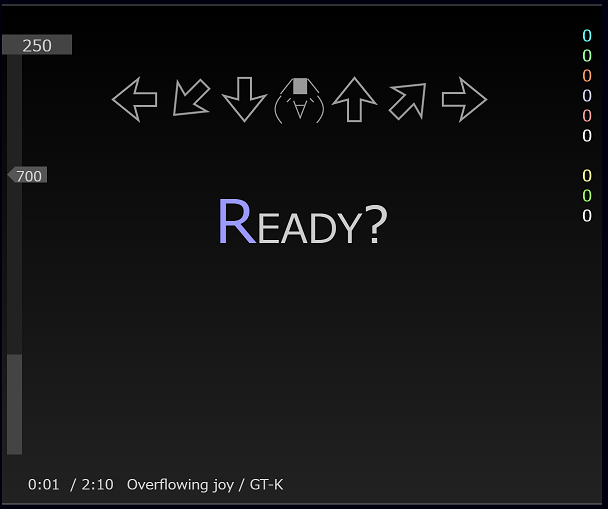
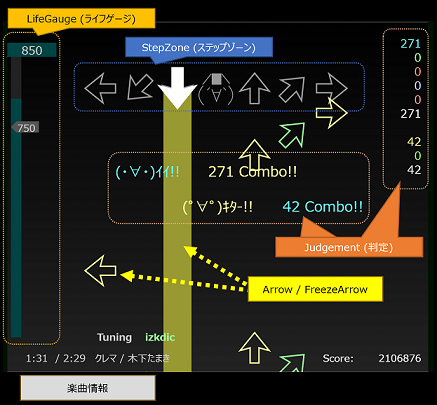
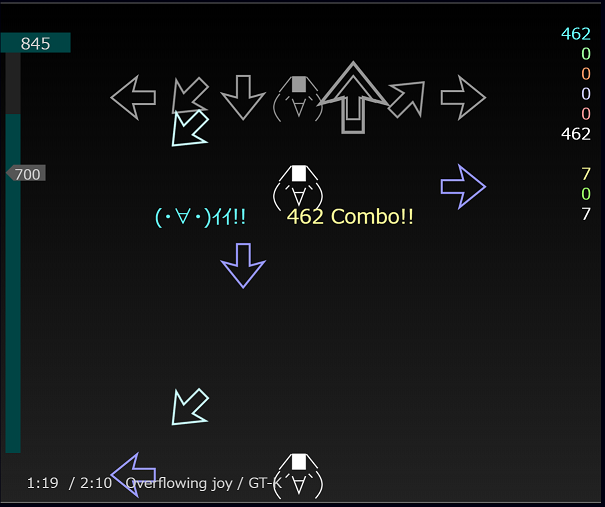
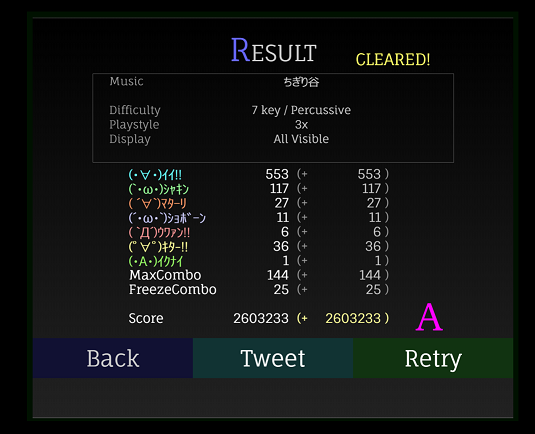
タイミング良くキーボードを押すと(・∀・)イイ!!や(゚∀゚)キター!!となり、ライフが上がります。
一方、タイミングを外すと(´・ω・`)ショボーン、(`Д´)ウワァン、(・A・)イクナイとなり、ライフが下がります。
ゲーム終了までにライフゲージのライフが残っているか、ノルマ以上であればゲームクリアです。
(When you press the keyboard with good timing (・∀・)イイ!! (゚∀゚)キター!! and life will go up. On the other hand, if you remove the timing (´・ω・`)ショボーン, (`Д´)ウワァン, (・A・)イクナイ will be, life falls. If the life of the life gauge remains by the end of the game or it is over the quota, the game is cleared.)